Free AI Background Remover – No sign-up, use it right in your browser

Use it with any photo where you want the background gone—people, products, pets, you name it. It keeps the subject you care about and turns the rest into transparency. No extra software to install and no sign-up: upload an image and remove the background right away. Unlike many other sites, there is no tedious registration, and your photos are not uploaded to our servers, so you can try it free with peace of mind.

Drag image or click to select

PNG, JPG, WEBP supported

📋 How to Use

  1. Drag a PNG, JPG, or WEBP into the upload area above, or click Select File.
  2. When the preview appears, click Remove Background. The first time, the AI model (~40 MB) downloads, so it may take about 30–60 seconds. After that it is usually much faster.
  3. When the result appears on the right, click Download to save a transparent PNG. (The checkerboard pattern only shows where transparency is—there is no “grid” in the file itself.)

No login or payment. Processing happens in your browser, so your image is not uploaded to our servers.

💡 Before & after examples

Before and after: person photo, background removal example
Example 1: Portrait photo — the clearer the contrast between subject and background, the cleaner the result.
Before and after: product photo, background removal example
Example 2: Product photo — ideal for e-commerce listings needing a white or transparent background.
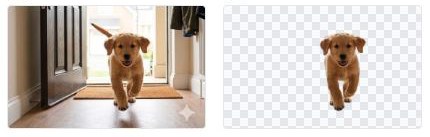
Before and after: animal / pet photo, background removal example
Example 3: Pet or animal photo — detailed fur can produce complex edges; review the result before saving.

Sample images for this page; your results may differ. Please try your own photo in the uploader above.

✨ How it works and when to use it

The on-device AI separates the foreground (what you want to keep) from the background, then makes the background transparent. That saves you from hand-drawing a mask in Photoshop when you just need a quick cutout for a shop listing or profile image.

Results vary by photo. Fine hair or fur may not be perfect, especially when hair color matches the background. Very large images take longer to process—worth keeping in mind if you are in a hurry.

What it handles well

  • Works well when there is a clear main subject—people, objects, or animals.
  • Busy backgrounds can often be removed, though very cluttered scenes may leave small artifacts.
  • High-resolution images are supported, but more pixels mean more processing time and memory.

Typical uses: e-commerce product images, YouTube thumbnails, profile pictures, and social posts where you want only the subject on a transparent layer.

Good use cases

  • E-commerce: consistent transparent PNGs for product photos
  • Thumbnails: drop the background so you can add text or frames on top
  • Profile photos: simple cutouts for resumes or forums
  • Social content: isolate the subject for stickers or collages

Compared with other services

Well-known tools (e.g. remove.bg) are convenient but often limit free credits or resolution. Webooro does not require sign-up for this tool, and processing runs locally in your browser so your file is not sent to our servers.

Every product differs in speed and polish—if you need print-ready artwork, always review the output once before final use.

❓ Frequently Asked Questions

Q. Is it really free?
Yes. This background remover is offered at no charge.
Q. Do I need to sign up or log in?
No. You can use it directly on this page without email or social login.
Q. Will image quality get worse?
We save a transparent PNG that stays as close to the original as possible. Edges may look slightly different after AI cleanup, and upscaling a small image will still look soft.
Q. Which photos give the best results?
Photos where the subject and background differ in color or brightness work best. Similar tones (e.g. dark hair on a dark wall) are harder for any automatic tool.
Q. Why does processing take so long?
The first run downloads the AI model (~40MB). Later runs are faster. Higher resolution images take longer.
Q. Can it remove backgrounds from objects (not people)?
Yes—use it for products and props. If you need to remove people and keep the scenery, use our separate “Person Remover” tool instead.
Q. Can I replace the background with white?
This tool makes the background transparent (PNG). To get a white background, download the transparent PNG, then convert it to JPG using our Image Converter — transparent areas become white automatically in JPG format.
Q. Is there a file size limit?
No server-side limit, since processing runs entirely in your browser. Very high-resolution images (above 4K) may be slower depending on your device. Standard phone photos (12MP or less) process quickly.

🖼️ Try uploading above and download when you are happy with the result. If something seems off, check the FAQ below.

More useful tools to try